History of Operating System Concepts (Dinosaurs book)

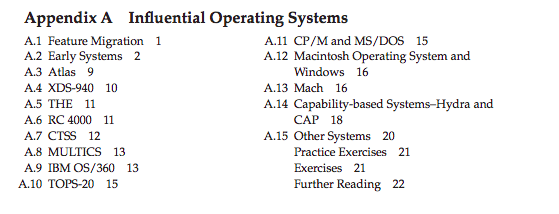
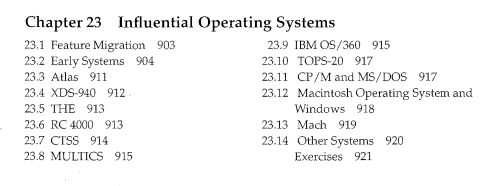
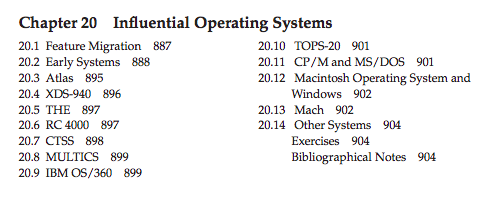
Here’s a clip from the contents of the 8th edition:

image

Here’s the 9th:

image

Here’s the 10th:

image

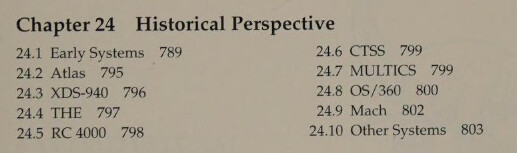
But in the 5th edition - available to borrow at the Internet Archive - I see rather more of the history in the body of the text, specifically in the bibliographical notes at chapter ends (13 mentions of Atlas). Also we have

image

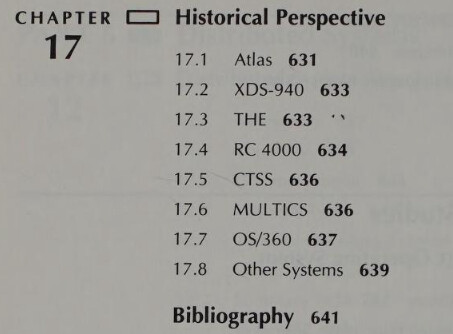
In the 3rd edition - borrow here - we get 17 mentions of Atlas.

image

1 Like

I wondered what the early and other systems were.
The preview on the Internet archive is very limited, but I found a full edition elsewhere.
Very disappointing. Just some few lines. And 2 other systems (MCP for Burroughs and SCOPE for CDC 6600).
Early systems have some more lines and is separated by dedicated, shared systems and those with overlapped i/o. But I haven’t found any OS mentioned just 2 machines.

I don’t like the child-style cover (pictured).
I have checked some chapters (10th ed) and most are very short. So someone has to buy more books anyway and the brief info can easily be found on the web.

The second ed, arrived in the mail today. It covers most general operating system
concepts in general, and a good overview of the older OS’s. I was hoping for more
information on device drivers, but there is nothing but general information. Like all
OS books they push time sharing concepts like virtual memory and swapping.

The book on operating systems I am looking for would be called ‘recursive operating systems’ as that seems to make the most sense in writing a OS. Level 0 would be raw
devices DSK:n TTY:n . Level 1 Fixed length Files and raw device streams. Level 2 Directories and files and redirection. Level 3 Time sharing.

I bought a copy as I had not heard of this before. It looks like a great broad overview. Older, interesting OS chapters have been shed by later editions of the book. It does not have nice, tasty low level details. Such as how to write and process OS interrupts, device drivers, OS boot code, etc.

1 Like

But it states one important development, No Fat table. The FAT concept seems to a rather late idea only with M$ Basic and Dos. I suspect this is because by then did you have the memory for a FAT table for Fixed Disks.
its a bit boring, but in this video I talk about the CTTY command in MS-DOS 2.0 to redirect its output across serial I/O

Sharp PC-5000 w/ BUBBLE MEMORY MS-DOS 2.0 usage EDLIN, CTTY, MASM, BASIC, Pascal, WordStar, more!

2 Likes

Hey, that’s a great demonstration - and motivated too, in that there’s something you needed to do and CTTY with null modem helped you do it. Thanks!

2 Likes

I have the second edition of this book, which is the one that Tanenbaum cites in the 1st edition of OSDI. On that one, the dinosaurs are neon! :slight_smile:

3 Likes

Here’s the cover of the 2nd Edition, and as an added bonus, I found the Final Exam from the Operating Systems course I took in college, which was taught using this book.


3 Likes

I do like question 5! It really is looking for understanding, not memorisation:

QUESTION 5: (6 Points) Chapter 5 in our textbook, entitled Memory Management, discusses paging and segmentation. Chapter 6 in our textbook, entitled Virtual Memory also discusses paging and segmentation. What distinguishes the material in chapter 6 from the material in chapter 5?

2 Likes

I kind of like the idea that a DOS isn’t an OS, and it shouldn’t necessarily try to be. It is for managing the disk rather than the whole computer. Similar to how a BIOS isn’t an OS. The disk needs managing because it is shared with programs that run later, but there are advantage and a simplicity for the currently running program to have basically bare-metal access to the RAM and processor and keyboard and graphics.

But then there is a whole bunch of software that runs mostly bare metal and you don’t want to give that up by switching to running an OS, even when an OS would be nice for multitasking and security.

This is perhaps an overly literal interpretation of DOS/Disk Operating System. MS-DOS didn’t completely stick to disk management, but it did leave a fair bit of stuff that programs could do by themselves.

1 Like

I have a copy of this book.

1 Like

I Have the same book too:) My dinosaur (computer) keeps crashing at random is a problem.
Did many computer projects in the 70’s end early do to flaky hardware. back on topic.
A lot of books keep changing information with every new edition.I really want 1st edition
of all my favorite books. Unix made it to fame, but was there ever other file systems out there
that had similar features. Sub directories, hard drives 2.5 to 40 meg in size, kernel and data <= 64Kb.
user space 64Kb+ ?

How about the TOPS-10 or TOPS-20 filesystems?